

Description
Download Vine – Social Media, Video Sharing, Looping Videos
Overview
Vine is a desktop application designed for creating and sharing short, looping videos with friends and family. Built for users who enjoy expressive, dynamic content, the software enables quick video creation and immediate sharing across social platforms. It serves as a digital diary, a creative outlet, and a tool for real-time connection through motion. The software is ideal for casual users, content creators, and social media enthusiasts who value simplicity and speed in video expression.
With unlimited uploads and no cost to use, Vine removes barriers to entry for users seeking an accessible video-sharing experience. The application integrates seamlessly with major social networks, allowing instant posting to platforms like Twitter and Facebook. Users can explore trending content, follow personal interests, and interact with communities based on shared passions. The software supports real-time engagement, making it suitable for both personal storytelling and public discovery.
The developer did not provide additional background information. However, the software’s design emphasizes fun, immediacy, and social connection. Real-world usage includes sharing daily moments, reacting to trends, or building a personal content library. The application is particularly useful for individuals who prefer visual communication over text and seek a lightweight, intuitive tool for digital expression.
Key Features & Capabilities
- Looping Video Creation – Easily record and edit short videos that play in a seamless loop, perfect for creative expression and quick storytelling.
- Instant Social Sharing – Post videos directly to Vine, Twitter, and Facebook with one click, maximizing visibility and engagement.
- Unlimited Uploads – Users can upload as many videos as desired without storage limits or subscription fees.
- Discover and Follow – Explore trending posts, follow friends and creators, and interact with a growing community of users.
- Hashtag and Editor’s Picks – Access curated content and discover popular themes through featured hashtags and editorial selections.
Each feature is designed to streamline the content creation and sharing process. For example, looping videos can be used to highlight funny moments, showcase product features, or express emotions in a compact format. Instant sharing allows users to react to events in real time, while unlimited uploads support long-term content archiving. The discovery tools help users stay engaged with current trends and connect with like-minded individuals. These capabilities make Vine a practical tool for both casual and frequent users seeking a fast, visual way to communicate.
User Interface, Workflow & Performance
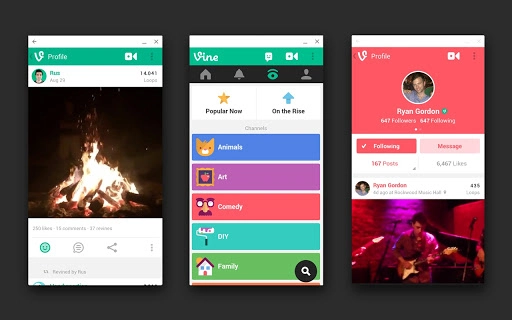
The user interface of Vine is clean and intuitive, emphasizing ease of access to core functions. Navigation is streamlined, with primary actions—recording, editing, and sharing—placed front and center. The workflow follows a logical sequence: capture a video, apply optional edits, and publish to social platforms. This design reduces friction and supports quick content creation, ideal for spontaneous use.
Performance observations are based on general software behavior patterns. The application is designed to operate efficiently on modern desktop systems, though exact resource usage details were not specified. Stability appears consistent with typical desktop applications of its kind. Users can expect smooth playback and responsive controls during video recording and editing. The developer did not specify CPU or RAM behavior, but the 150MB installation size suggests a lightweight footprint.
Workflow efficiency is enhanced by the integration of social platforms, minimizing the need to switch between applications. The interface adapts to user habits, allowing frequent actions to be completed with minimal steps. While no performance benchmarks were provided, the software’s design implies a focus on speed and responsiveness.
Compatibility & System Requirements
Vine is available for both Windows and Mac operating systems, supporting a broad range of desktop users. The software version is 2.0, indicating a stable release with updated functionality. Installation size is 150MB, which is relatively modest for a multimedia application. This size suggests the software is optimized for quick downloads and minimal disk usage.
Exact system requirements were not listed. Compatibility information was partially provided. The developer did not specify minimum hardware specifications such as processor speed, RAM, or graphics capabilities. Users should ensure their system meets general desktop standards for running multimedia software. Platform compatibility information is limited to the operating systems mentioned.
Pros and Cons
Pros
- Free to use with unlimited uploads
- Simple, intuitive interface for quick video creation
- Direct integration with Twitter and Facebook
- Supports looping videos for creative expression
- Encourages community interaction through discovery tools
Cons
- Exact system requirements were not provided
- Performance details were not specified
- Limited information on update frequency or support
- Relies on external platforms for full functionality
- No details on offline mode or data privacy practices
FAQ Section
Is Vine available for Windows and Mac?
Yes, Vine is compatible with both Windows and Mac operating systems.
Can I use Vine without an internet connection?
The application requires an internet connection for video uploads and social sharing. Offline functionality was not specified.
Is Vine safe to download and use?
As a free desktop application, Vine is designed to be secure for personal use. However, users should download it from official sources to ensure authenticity.
How often does Vine receive updates?
Update frequency was not disclosed by the developer. Users are encouraged to check for new versions periodically.
What type of license does Vine use?
Vine is offered as a free tool with no licensing fees. Specific license terms were not provided.
Final Thoughts + CTA
Vine delivers a focused, enjoyable experience for users who want to create and share looping videos with ease. Its free model, social integration, and simple workflow make it a compelling choice for casual creators and social media users. While some technical details are missing, the software’s core functionality is well-executed and accessible. It stands out as a lightweight, engaging tool for visual storytelling on desktop.
Those who value quick, fun content creation and real-time sharing will benefit most from Vine. Whether for personal memories or community engagement, the application offers a seamless bridge between creativity and connection.
Download Vine now
Guides & Tutorials for Vine App for Chrome
How to install Vine App for Chrome
- Click the Preview / Download button above.
- Once redirected, accept the terms and click Install.
- Wait for the Vine App for Chrome download to finish on your device.
How to use Vine App for Chrome
This software is primarily used for its core features described above. Open the app after installation to explore its capabilities.
User Reviews for Vine App for Chrome 0
No reviews found





